The Byker Wall is home to over 600 flats and maisonettes, and with hundreds of people going in and out of the building every day, it’s important to keep the building secure to ensure the safety of you, your home and your neighbours.
As a resident you are allocated an access fob so you can easily get to your home through communal entrances, but it’s important that you do not share this fob. If the fob is lost or stolen, please report it to us immediately so we can cancel the fob and give you a new one.
Please also be aware of anyone trying to follow you into the building without an access fob. People often “tailgate” (follow behind you) to gain access to buildings. Remaining aware of who’s around you can ensure we keep the wall as safe as possible. If you see any suspicious behaviour please report it to us directly, or if it is an emergency please contact the police immediately.
Sometimes people who do not live in the building try to gain access, which can result in antisocial behaviour. Please always check who is calling your flat intercom system before allowing entry to the building. If someone is continuously calling your flat creating unwanted noise and disruption, you can set your intercom system to do not disturb by:
AT-07 intercom
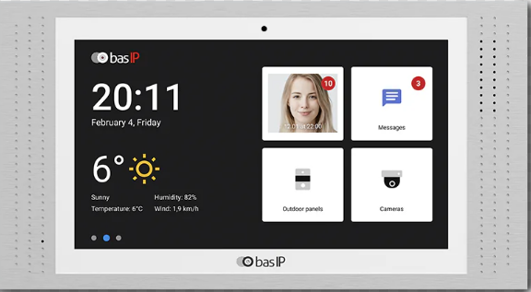
How to Configure Do Not Disturb and Silence Modes
Your device offers two sound‑control features - Do Not Disturb mode and Silence mode. Each designed to limit interruptions in different ways. Both modes can be scheduled in advance.
Do Not Disturb Mode
Do Not Disturb turns off all sounds except the alarm. Incoming calls from other devices will not appear on the screen.
Any calls received during this time will be stored as missed calls on the main screen.
How to set it up
1. Open the General section in the monitor settings.
2. Select Mode.
3. Turn on Do Not Disturb mode.
4. Choose the start and end times for when the mode should be active, then save the schedule.
Silence Mode
Silence mode also turns off all sounds except the alarm, but in this mode, incoming calls will still
appear on the screen.
How to set it up
1. Open the General section in the monitor settings.
2. Select Mode.
3. Turn on Silence mode.
4. Set the start and end times, then confirm your selection to save the schedule.
Older intercom
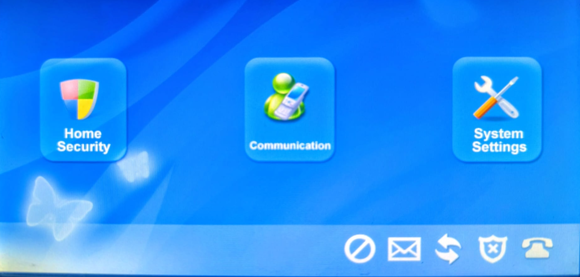
On the bottom of the screen there are several icons, tap the first icon (the circle with a line through) to turn on the privacy function which will stop the intercom ringing.




The Byker Wall is home to over 600 flats and maisonettes, and with hundreds of people going in and out of the building every day, it’s important to keep the building secure to ensure the safety of you, your home and your neighbours.
As a resident you are allocated an access fob so you can easily get to your home through communal entrances, but it’s important that you do not share this fob. If the fob is lost or stolen, please report it to us immediately so we can cancel the fob and give you a new one.
Please also be aware of anyone trying to follow you into the building without an access fob. People often “tailgate” (follow behind you) to gain access to buildings. Remaining aware of who’s around you can ensure we keep the wall as safe as possible. If you see any suspicious behaviour please report it to us directly, or if it is an emergency please contact the police immediately.
Sometimes people who do not live in the building try to gain access, which can result in antisocial behaviour. Please always check who is calling your flat intercom system before allowing entry to the building. If someone is continuously calling your flat creating unwanted noise and disruption, you can set your intercom system to do not disturb by:
AT-07 intercom
How to Configure Do Not Disturb and Silence Modes
Your device offers two sound‑control features - Do Not Disturb mode and Silence mode. Each designed to limit interruptions in different ways. Both modes can be scheduled in advance.
Do Not Disturb Mode
Do Not Disturb turns off all sounds except the alarm. Incoming calls from other devices will not appear on the screen.
Any calls received during this time will be stored as missed calls on the main screen.
How to set it up
1. Open the General section in the monitor settings.
2. Select Mode.
3. Turn on Do Not Disturb mode.
4. Choose the start and end times for when the mode should be active, then save the schedule.
Silence Mode
Silence mode also turns off all sounds except the alarm, but in this mode, incoming calls will still
appear on the screen.
How to set it up
1. Open the General section in the monitor settings.
2. Select Mode.
3. Turn on Silence mode.
4. Set the start and end times, then confirm your selection to save the schedule.
Older intercom
On the bottom of the screen there are several icons, tap the first icon (the circle with a line through) to turn on the privacy function which will stop the intercom ringing.
More news
Spring skips
7 April 2026
Universal Credit: updating your rent increase
1 April 2026